AI is reshaping the way marketing materials are produced. The deep integration of Codex and Canva creates an automated pipeline from topic selection to publication, enabling bulk and standardized production of brand visuals. This article details six practical strategies and four workflows to transform AI into an efficient ‘design engineer’ that meets the massive content demands of marketing teams.

The most effective way to use Codex for creating marketing visuals is not to let AI randomly generate images but to establish a stable production line:
Topic Library → Codex Generates Material Data → Canva/HTML Template Batch Production → Automated Quality Check → Manual Review → Multi-Platform Publication → Data Feedback for Topic Selection.
Utilize Codex as an ‘automated production/code execution/template engineer’ by integrating Canva, GPT Image, HTML/SVG/React templates, and spreadsheet data to form a batch image production pipeline.
1. Use Cases and Examples
1. Codex + Canva: Generate Brand-Consistent Marketing Images with Natural Language
Canva now supports generating, previewing, and editing designs within ChatGPT, and can integrate with Brand Kit to automatically adhere to brand guidelines for fonts, colors, logos, and tone. Canva has provided examples like “creating Instagram promotional posts” and “batch editing 50-page decks,” which are ideal for rapid production of marketing visuals, event posters, social media covers, and advertising materials.
Suitable for:
- Xiaohongshu cover images
- Instagram / Facebook / LinkedIn image posts
- Event posters
- Course/tool product promotional images
- Multi-language version materials
- Different title A/B test images on the same theme
Reusable Approach:
Codex/ChatGPT is responsible for: breaking down topics, writing titles, generating image-text structures, checking copy length, and batch generating material briefs.
Canva is responsible for: generating editable designs based on brand templates and exporting PNG/JPG/PDF.
2. Codex + Canva MCP: Transform Canva into a Design Tool in AI Workflows
According to Canva MCP documentation, the AI assistant can call upon Canva’s design generation, editing, material/brand management, design library retrieval, exporting, and collaborative commenting capabilities; Canva also provides a remote MCP server that many AI tools can connect to.
This means Codex can take on these roles in the marketing material production pipeline:
- Generate material brief based on the topic library
- Call existing brand templates in Canva
- Batch modify text in images
- Generate different platform sizes
- Export PNG / JPG / PDF / MP4
- Add comments or enter the review process for materials
Suitable Team Scenarios:
Marketing team members only maintain the topic table; Codex reads the table and generates materials based on templates; design/growth leads only perform reviews and minor adjustments.
3. Codex + Canva Bulk Create: Batch Image Generation from Spreadsheets
Canva’s official Bulk Create feature supports batch filling template content via Excel/CSV; it also allows data connection from Canva Sheets, mapping fields, and batch generating designs.
This is the most accessible low-barrier solution for marketing teams to implement immediately.
Typical Case:
A Canva template with reserved fields, then Codex batch generates a CSV, and Canva automatically generates 20/50/100 images upon import.
Suitable for:
- 100 Xiaohongshu cover images
- Question explanation cards
- Other content suitable for batch production
4. Codex + Canva Autofill API: More Engineering-Oriented Dynamic Design Production
Canva’s Autofill API can generate dynamic designs based on Brand Templates and input data; an official example includes filling city names, weather information, etc., into templates to create new designs. Note that the Brand Template and Autofill APIs are intended for Canva Enterprise organization members.
Suitable for More Mature Teams:
- Have fixed brand templates
- Have data sources, such as Google Sheets, Feishu multi-dimensional tables, CMS
- Want to automatically generate material links and thumbnails
- Want materials to enter review/publishing systems
Process:
A new topic is added to the Feishu multi-dimensional table → Codex checks the fields → Calls Canva Autofill → Generates design → Returns Canva link/thumbnail → Marketing review → Publication.
5. Codex + GPT Image: Directly Generate High-Quality Marketing Images
OpenAI’s image generation model official guide states that the GPT Image model is suitable for professional design tasks and iterative content creation, with capabilities including clear text rendering, complex structured visuals, infographics, multi-panel compositions, and brand design system style control.
Suitable for:
- Concept posters
- Infographics
- Product advertisement images
- Contextual illustrations
- Flowcharts
- Comparison images
- Multi-language material images
However, for marketing purposes, directly generating images presents a challenge: post-editability is not as good as Canva/HTML templates. Therefore, it is recommended to:
Use Canva/HTML templates for fixed text information, brand logos, prices, and CTAs;
Use GPT Image for background illustrations, scene images, and atmosphere images.
6. Codex + HTML/SVG/React: Build Your Own ‘Material Image Generator’
Codex is officially positioned to read, edit, and run code, and can work in environments like CLI, IDE, and cloud; its official use cases also include data analysis report generation, front-end design implementation, and automation tasks.
This capability can be used to build an internal tool:
Input CSV / JSON / Feishu table data
→ Codex generates or maintains HTML/SVG/React templates
→ Automatically fill in titles, subtitles, tags, CTAs
→ Use Playwright/Puppeteer to take screenshots and export PNG
→ Batch generate Xiaohongshu/WeChat/advertising materials.
Suitable for:
- Have a large amount of fixed content structure
- Need to frequently test titles
- Want to maintain a unified design style
- Prefer not to manually format in Canva each time
- Wish to integrate with SEO/Xiaohongshu topic libraries
Core Techniques for Creating Marketing Images with Codex
Technique 1: Do Not Let Codex ‘Freely Design’, Instead Maintain Templates
The most stable approach is not to let Codex design from scratch each time but to first fix 5-8 sets of templates:
- Pain point cover
- Checklist cover
- Comparison cover
- Flowchart cover
- Countdown cover
- Tool recommendation cover
- Pre-exam reminder cover
- User scenario cover
Codex’s task is:
Determine which template to use based on the topic and fill in the title, subtitle, tags, CTA, and image prompt words.
Technique 2: Break Down Materials into 6 Fields for Batch Production
It is recommended to break down each marketing image into:
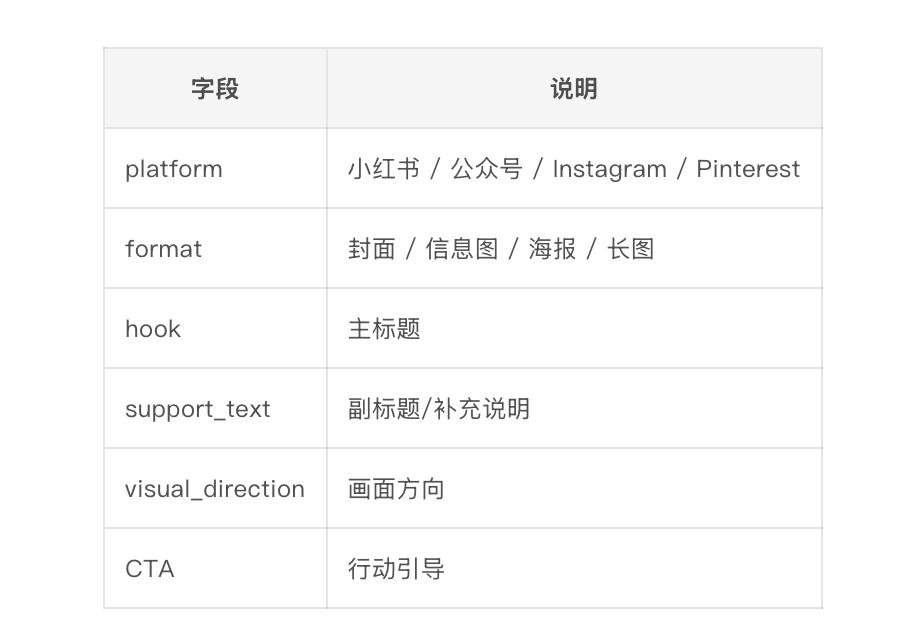
Technique 3: Separate Prompts into ‘Content Prompts’ and ‘Design Prompts’
Do not mix all requirements together. It is advisable to separate them into two layers.
Design Prompts:
You are a visual designer for marketing.
Please convert the following title into a Canva/HTML material brief.
Output fields:
– main_title
– subtitle
– badge_text
– background_style
– icon_suggestion
– layout_type
– CTA
– risk_note
Brand requirements:
– Clean, techy, educational tool feel
– Avoid excessive hype
– Suitable for xx exam preparation audience
– Avoid expressions like ‘guaranteed score’ or ‘must pass’ that violate regulations.
Technique 4: Prioritize ‘Text-Controlled’ Image Types
The most challenging aspect of AI-generated images is complex text. Even though new models have significantly improved text rendering capabilities, the official guidance emphasizes their suitability for text-heavy visuals, structured visuals, and infographics, it is still recommended to place key text in editable template layers during actual marketing operations.
Priority Suggestions:
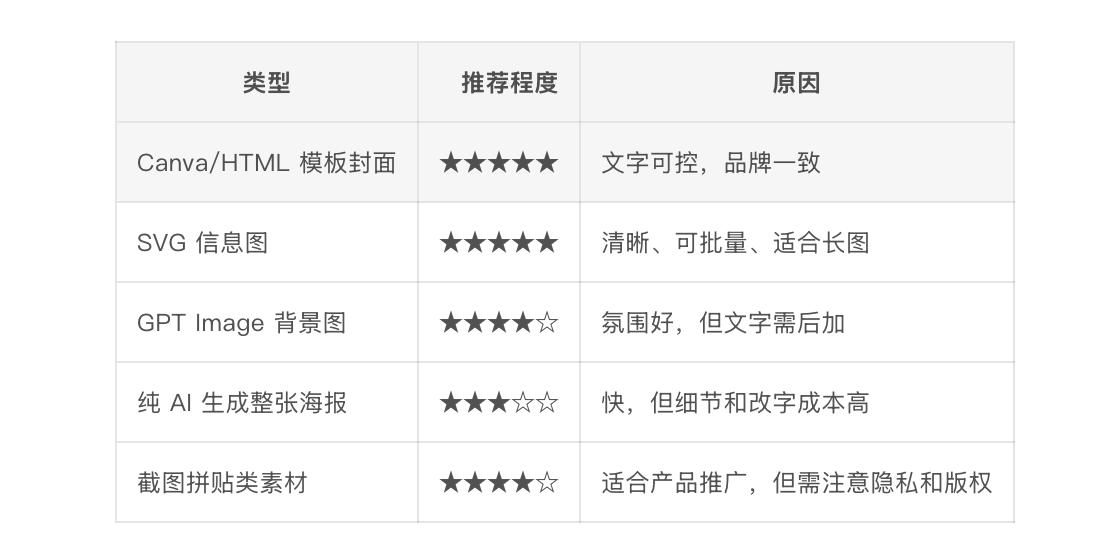
Technique 5: Establish ‘Automated Quality Check Rules’ for Materials
OpenAI’s image evaluation examples emphasize that production-grade image workflows cannot rely solely on aesthetics; they also need repeatable evaluation criteria to check whether requirements are met, whether they are safe, and whether predictable improvements can be made.
Quality check items for marketing images can include:
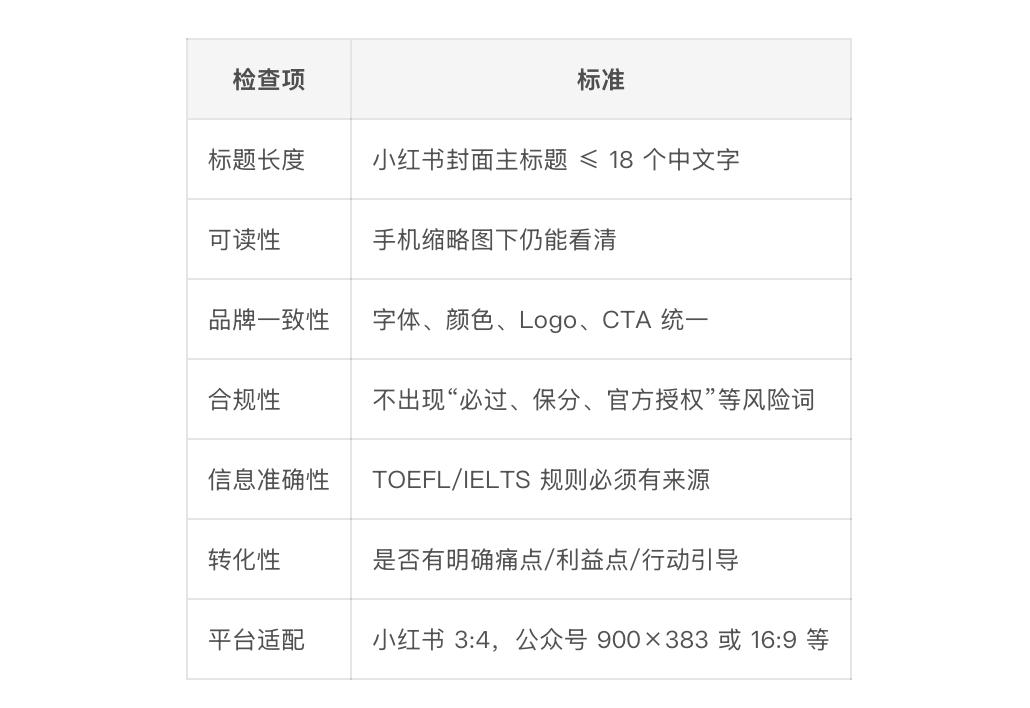
Four Workflows for Batch Content Production
Workflow A: Low-Barrier Version, Suitable for Immediate Start
Tools: ChatGPT/Codex + Google Sheets/Feishu Tables + Canva Bulk Create
Process:
- Maintain a topic table
- Codex batch generates titles, subtitles, CTAs, and template types
- Export CSV
- Create 3-5 templates in Canva
- Use Bulk Create to batch import CSV
- Manually select the best 20%
- Export for publication
Suitable for: Xiaohongshu covers, friend circle posters, WeChat official account cover images, community promotional images.
Advantages: Low cost, stable, controllable.
Disadvantages: Still requires manual import and review.
Workflow B: Semi-Automated Version, Suitable for Growth Teams’ Daily Use
Tools: Codex + Feishu Multi-Dimensional Tables + Canva + Manual Review
Table Fields Suggested:
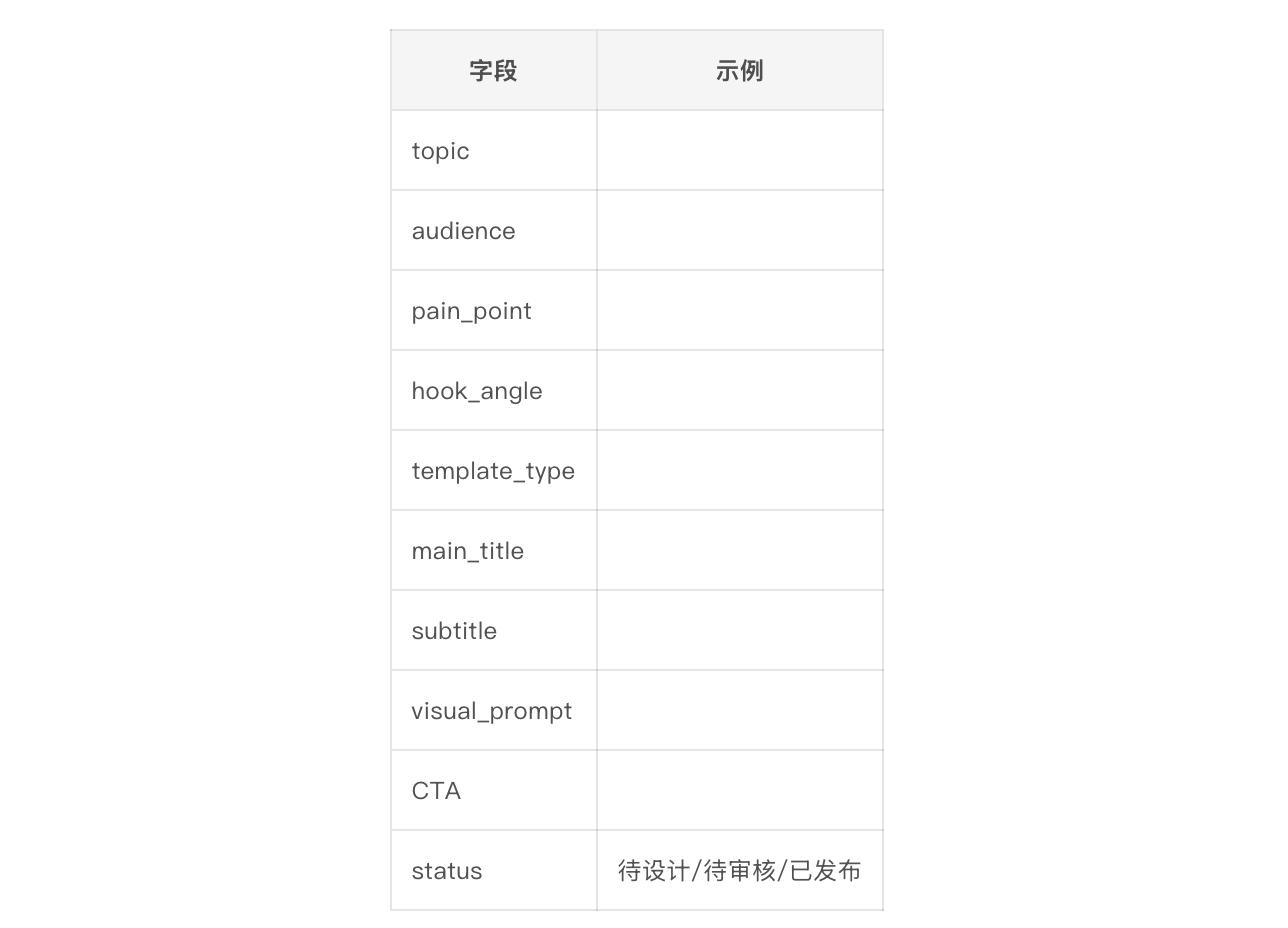
Codex can be responsible for:
- Reading ’to be designed’ topics
- Generating 5 title versions
- Generating Canva briefs
- Generating image prompt words
- Outputting CSV
- Marking status
- Generating corresponding Xiaohongshu text and topic tags
Workflow C: Engineering Version, Suitable for Building an Internal ‘Marketing Material Generator’
Tools: Codex + Next.js/React + Tailwind + Playwright + CSV/JSON
Process:
- Codex sets up a /templates folder
- Each template is a React component
- Data comes from content.csv or Feishu API
- Script loops through rendering each piece of data
- Playwright takes screenshots to export PNG
- Automatically generate different sizes
- Output to /exports/xiaohongshu/, /exports/wechat/, /exports/ads/
Codex is well-suited to maintain such projects because the official workflow emphasizes providing Codex with clear context and explicit completion definitions, allowing it to iterate continuously around file paths, validation steps, and output standards.
Example Directory Structure:
creative-generator/
data/
topics.csv
templates/
PainPointCard.tsx
ChecklistCard.tsx
ComparisonCard.tsx
CountdownCard.tsx
scripts/
render.ts
export-png.ts
outputs/
xiaohongshu/
wechat/
instagram/
brand/
colors.json
typography.json
logo.png
Workflow D: Advanced Automation Version, Suitable for Future Scaling
Tools: Codex + Canva Autofill API / Canva MCP + Feishu/Google Sheets + Zapier/Make/Gumloop
Process:
- A new topic is added to the Feishu table
- Codex generates material briefs based on fields
- Automatically selects Canva Brand Template
- Autofill/API fills in titles, subtitles, images, CTAs
- Returns Canva design links and preview images
- Responsible person reviews
- After approval, enters the publication queue
Canva’s official Connect API documentation states that Autofill can generate dynamic designs using Brand Templates and input data; Canva MCP also supports design generation, editing, exporting, brand management, and collaborative commenting.
Comments
Discussion is powered by Giscus (GitHub Discussions). Add
repo,repoID,category, andcategoryIDunder[params.comments.giscus]inhugo.tomlusing the values from the Giscus setup tool.